Section 12 · Troubleshooting
Organised by what you notice, not by which part is at fault — because the symptom is what you have when the problem starts.
⭐ Three questions first, before anything below. They solve or halve most problems:
- What does the machine's own touchscreen say? It is the only thing in the room that is not ALPS's opinion of the machine.
- What version of ALPS? — Settings ▸ About.
- Did this ever work, and what changed? A machine moved, a camera nudged, a new material, a different computer.
12.1 "The laser won't move" / "auto-focus does nothing"
⭐⭐ Look at the three status icons on the right-hand edge of the machine's touchscreen. Are they green?
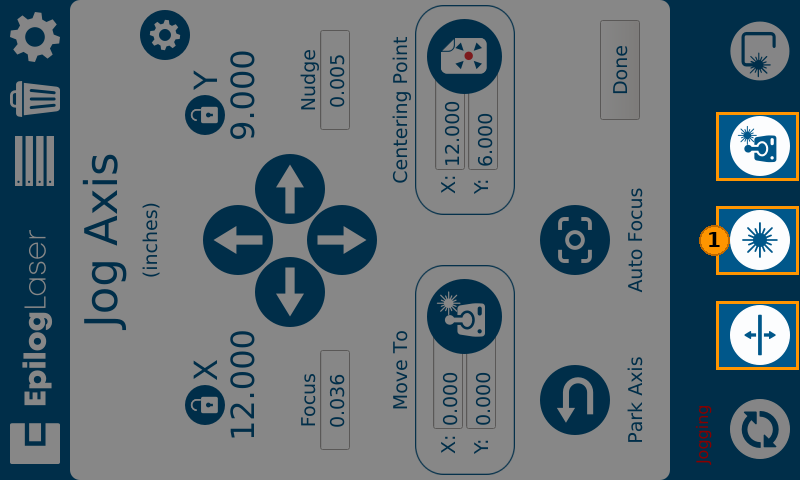
This is a real capture of a real machine, and it is disabled. Every readout on it is normal — X 12.000, Y 9.000, Focus 0.036, a sensible centering point — and the machine will not move a millimetre. The only thing on the whole screen that says so is the colour of those three icons.
They are green when the machine is enabled and blue when it is not, and the machine will not move unless they are green — not over the network, and not from the panel's own arrow buttons either.
⛔ This is worth checking first, every time, because the state is invisible everywhere else. X, Y, Focus, centering point — every readout is identical whether the machine is enabled or not. Nothing announces "disabled" except the colour of three small icons. A perfectly normal-looking screen is exactly what a disabled machine shows you.
It cost us a full evening of engineering time on a machine that was reachable, answering every query, and silently ignoring every movement command.
ALPS gives up after 90 seconds and tells you what to check, rather than hanging.
12.2 "The camera view doesn't line up with where it engraves"
Did you run both calibration passes?
⭐ This is the most common cause and the answer is usually no. Pass 1 produces a beautifully aligned overlay on its own, so it looks finished. It cannot be: pass 1 photographs marks the laser made, so it can never see the machine's own marking error. Pass 2 is the only step that checks where the laser actually marks.
Then, in order:
- Was the sheet flat and butted against the rulers? A bowed sheet calibrates a curve as a plane.
- Has the camera been moved since? A calibration is of where the camera was.
- How many markers did it find? A low count means contrast — anodised aluminium works well, bare shiny metal often does not.
12.3 "Everything came out as one setting"
Your artwork is a single colour.
ALPS builds one process per distinct colour. A file where everything is black is one process with one set of settings, so everything got cut, or everything got engraved. Recolour what should be cut differently from what should be engraved.
⭐ If a logo imports as one stubborn object and will not take two colours, select it and press
Ctrl+K (Break Apart).
See Your first job.
12.4 "My part cut before it engraved" / "the part shifted"
Process order. Processes run top to bottom, and cutting a part free before the engraving finishes lets it move. Reorder so engraving comes first.
⭐ The habit worth building: before sending, ask which process runs first. Two seconds, and it prevents this entire category.
12.5 "The measurements are slightly out"
⚠ Be careful with expectations here. Camera calibration makes the overlay trustworthy for placement. It is not a guarantee of absolute dimensional accuracy.
If a job depends on a dimension, measure the part — not the picture of it.
Then consider kerf: a cut has width. A part measured across a cut edge reads narrow by roughly the beam width unless it was compensated.
12.6 "It says the camera is in use"
Another computer has it. ALPS announces itself with a trailing dot — THEIRPC. — which
distinguishes it from the Epilog Suite running on the same machine.
⚠ Be aware of a real limitation: on current firmware, asking for a busy camera takes it rather than queueing. If two people share one machine, coordinate between yourselves — the software will not arbitrate for you.
If nobody has it and it still fails, the machine's camera service may need a power cycle.
12.7 "The machine is unreachable" but it is plainly switched on
Ping is not enough. ALPS needs the machine's control service, and if that is down the machine answers a ping while refusing everything else.
Power-cycle the laser. ALPS is reporting correctly.
12.8 "It worked on my other computer"
Calibration is per machine, stored on the computer that did it. A second PC needs it shared or redone.
⚠ Cross-computer calibration pickup is not yet verified end to end. Do not assume it will simply work.
12.9 "I can't find a tool this manual describes"
Your skill level is below it. Settings ▸ General. See Section 3.5.
12.10 Getting help
Include these, or the first reply will be a request for them:
- ALPS version — Settings ▸ About
- A photograph of the machine's touchscreen — not a description of it
- Machine model and serial
- What changed since it last worked
- The exact wording of any error, rather than a paraphrase
⭐ The photograph is the single most useful thing you can send. It is the one piece of evidence that does not depend on anybody's interpretation, including ours.