Section 1 · Safety
⛔ This section covers what the software does about safety. It is not the machine's safety manual. Fire risk, exhaust, optics, electrical, and the laser safety rules for your specific model are in the Epilog owner's manual that came with the machine, and that manual is the authority. Read it. Nothing here replaces it.
⛔ A laser cutter can start a fire, and the fire risk is not a software problem. Never run a job unattended. Epilog's manual opens with a fire warning for good reason, and ALPS cannot see smoke.
1.1 What class your machine is
With the lid closed, an enclosed Epilog is a Class 2 laser product — the enclosure and interlocks are what make it so. This is Epilog's own statement, in their manual: "a Class 2 laser product, as defined in International Standard IEC 60825-1."
That is why ordinary operation needs no protective eyewear and no controlled area. The machine is built to contain the beam, and it does.
⚠ This changes completely in pass-through mode. See 1.2.
1.2 Pass-through mode, and the acknowledgement
Running with the front door open and the rear manifold removed — which is what pass-through requires, so material can extend out of both ends — removes the enclosure that made the machine Class 2.
⛔ That is an open-beam Class 4 laser hazard. Different rules apply, and they are not suggestions:
- Laser safety eyewear rated for this laser's wavelength and power, on everyone in the area — not just the operator.
- Physical barriers or controls so nobody unprotected can walk into the beam path.
- Compliance with your jurisdiction's laser safety regulations, which are yours to know.
Every time you enable pass-through, ALPS shows five statements and requires you to acknowledge each:
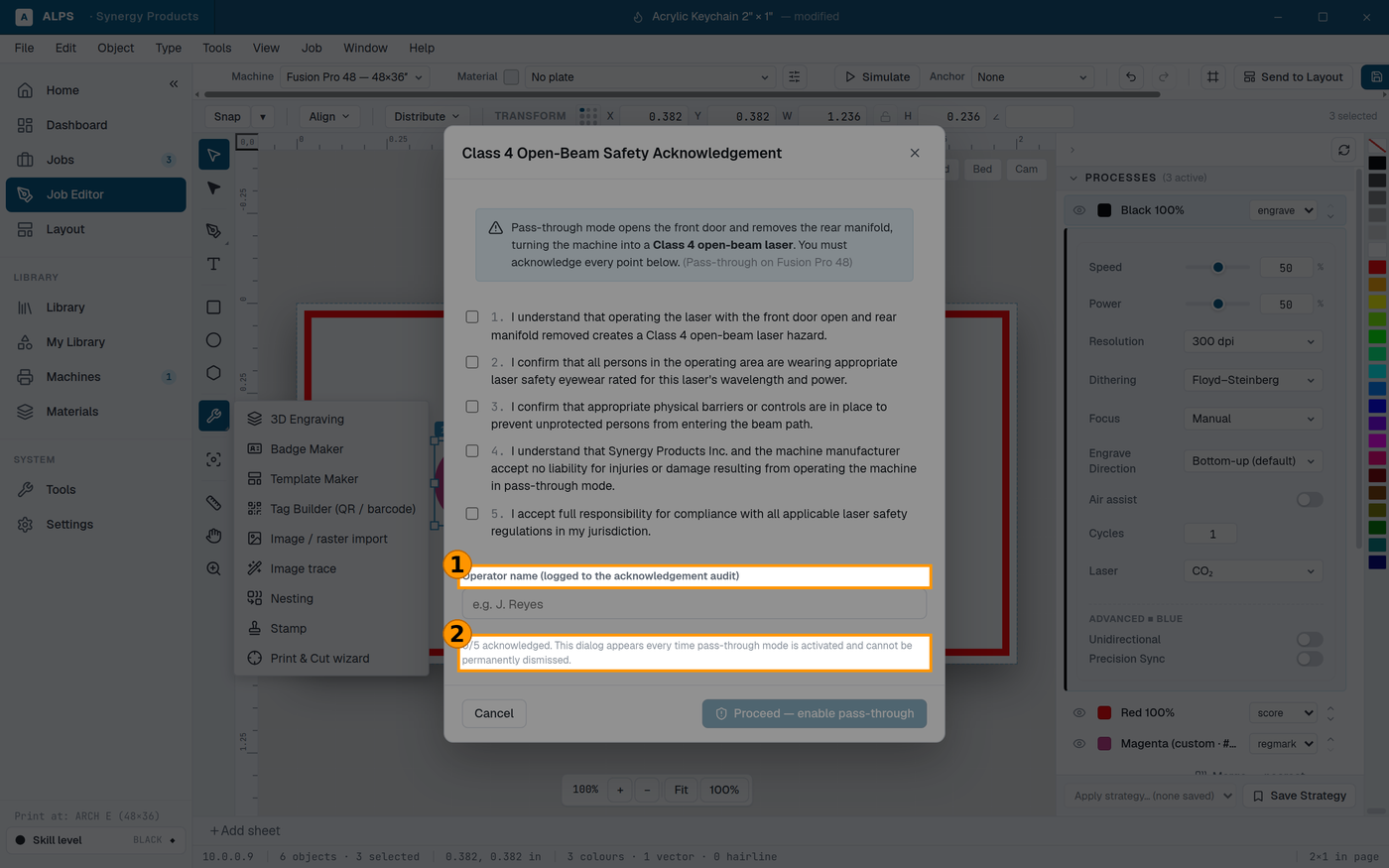
① Every statement must be ticked — the Proceed button stays disabled until all five are ② It appears on EVERY activation and cannot be permanently dismissed
- I understand that operating the laser with the front door open and rear manifold removed creates a Class 4 open-beam laser hazard.
- I confirm that all persons in the operating area are wearing appropriate laser safety eyewear rated for this laser's wavelength and power.
- I confirm that appropriate physical barriers or controls are in place to prevent unprotected persons from entering the beam path.
- I understand that Synergy Products Inc. and the machine manufacturer accept no liability for injuries or damage resulting from operating the machine in pass-through mode.
- I accept full responsibility for compliance with all applicable laser safety regulations in my jurisdiction.
⭐ There is deliberately no "don't show again", and no way to skip it. That is not an oversight and it will not be added. The acknowledgement applies to the conditions in the room right now — who is present, what they are wearing, what is barriered — and none of that is true because it was true yesterday. It is shown on every activation, and it does not survive being saved into a job file, because a job file is passed between operators and an acknowledgement belongs to one person at one moment.
⚠ Acknowledging is not a formality. If you cannot honestly tick all five, you are not ready to run pass-through. Close the machine and run it as a Class 2 job.
1.3 What ALPS refuses to do
⭐ Refusing is a safety feature, and it is worth knowing where it happens — a message that stops you is doing its job, not failing.
It will not drop the bed to a height it cannot verify. The machine does not report its current table height over the network. Because "down" is a larger number and there is no travel limit exposed, guessing a starting point could drive the bed with nothing to stop it. If ALPS does not know where the bed is, it refuses rather than assumes.
It warns before the head crosses a tall part. Crossing over a part needs the part's height plus 0.25″ of clearance — the nozzle rides close to the material. If the clearance is not there, ALPS says so and names the numbers:
The tallest part is 1.20″ so crossing it needs 1.45″ (height + 0.25″), but the clearance is 0.80″ — the nozzle may strike it. Either raise the clearance, or route around the part instead.
⭐ Routing around a part is as valid as clearing it, and often better: it moves no bed, so it cannot disturb a focus you have already set.
It warns when an autofocus point is too near the rulers. Stay 0.75″ in from the bed edges. The focus plunger measures whatever it physically touches — land it on a ruler and it returns the ruler's height, the table goes to the wrong plane, and every measurement afterwards is quietly wrong.
⚠ That is the nastiest failure on this page, because it looks like success. Nothing crashes and no error appears; the numbers simply stop meaning anything.
It gives up rather than hanging. If the machine stops answering, ALPS stops waiting after 90 seconds and tells you what to check. It deliberately does not retry: silently re-sending a movement command is how a head ends up somewhere you did not expect.
1.4 The habits worth having
- ⛔ Never leave a running job unattended. The single most important sentence in any laser manual.
- Know where your fire extinguisher is before you need it, not while you need it.
- Run the exhaust. Always, on every job, including quick ones.
- ⚠ Know your material. Some plastics — PVC above all — release gases that are dangerous to breathe and corrosive to the machine. If you cannot identify a material, do not cut it. This is a material question, not a settings question, and no software can check it for you.
- Watch the first part of a run, especially on an unfamiliar material. That is when a job that is going to catch fire tells you.