Badge Maker
Job Editor ▸ the wrench ▸ Badge Maker · ● Green
What it does
It builds a name-badge plate from a plate size and a list of text lines, then binds those lines to a spreadsheet so a hundred badges come out with a hundred names on them.
⭐ Two ways in, and they are the same tool. The Tools screen lists it under In the Job Editor — clicking takes you to the editor with the wizard open. Or open it directly from the wrench in the editor's left toolbar. See Section 3.3.
The three steps
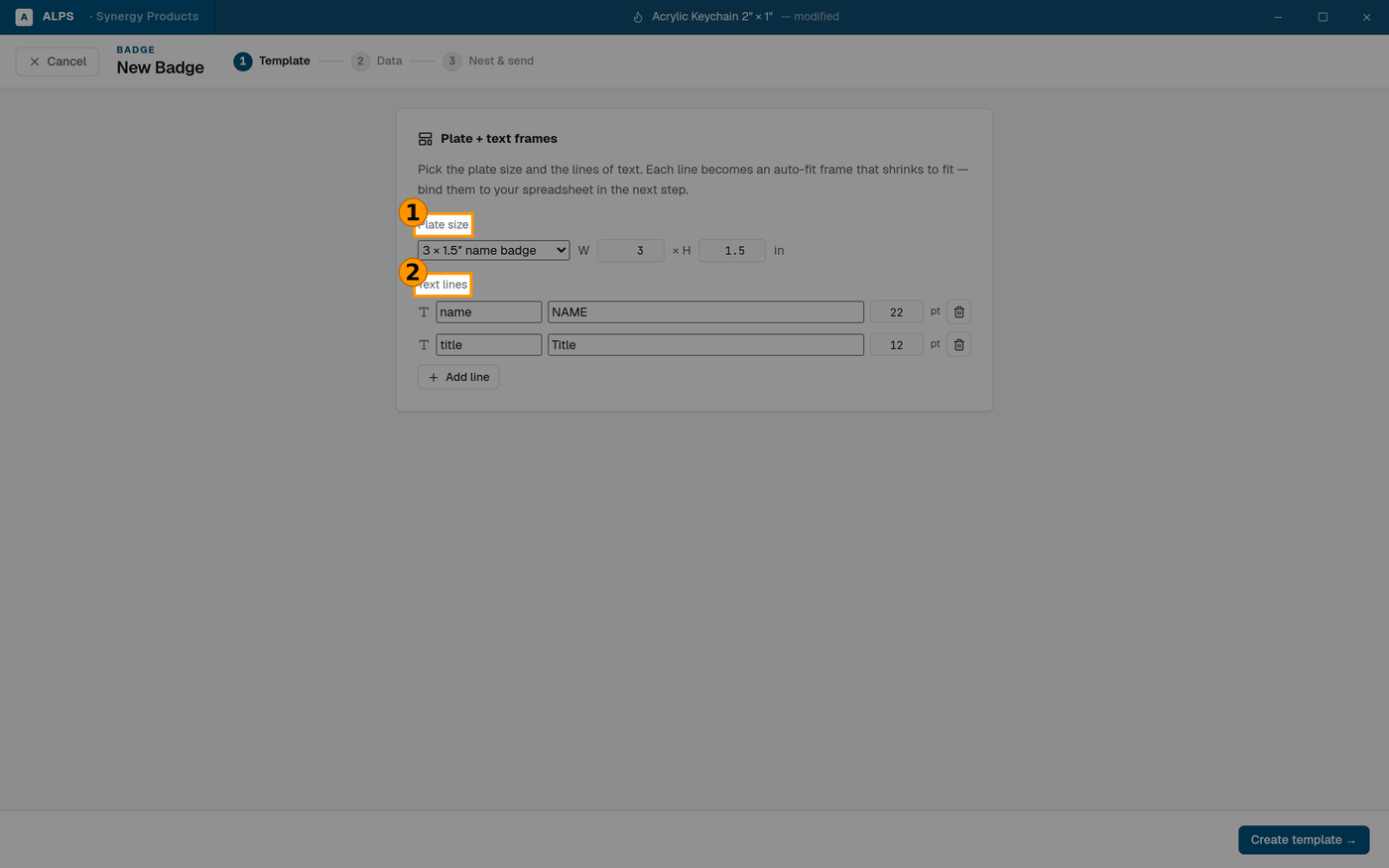
① Standard plate sizes, or type your own ② Each line becomes an auto-fit frame — a long name SHRINKS rather than overflowing
The wizard names them across the top:
- Template — the plate and the lines of text on it.
- Data — the spreadsheet the lines come from.
- Nest & send — arranging the badges on the material and sending them.
Step 1 — the template
Plate size offers standard sizes — 3 × 1.5″ name badge is the default — or type a width and height.
Text lines: each line has a name (a key, like name or title), the placeholder text you see
while designing, and a point size. Add line for more; the bin icon removes one.
⭐ Each line becomes an auto-fit frame that shrinks to fit. That is the feature that makes badge runs survivable: the point size you set is a maximum, and a long name shrinks rather than overflowing the plate or colliding with the line below. You do not have to check every name.
⚠ Set the plate size before the text. The frames are sized to the plate, so changing the plate afterwards re-flows everything.
Then Create template →.
Step 2 — the data
Bind each line to a spreadsheet column. The placeholder you typed is replaced per badge.
⭐ This is the same engine as Variable Data — if you already know that panel, you know this one. Badge Maker is the guided version for the job everybody actually asks for.
Step 3 — nest and send
Arrange the badges on your material and send. See Nesting (Section 10.3) for what the packing controls do.
⛔ Run one before you run ninety
Engrave a single badge and look at it: the longest name in the list, not the first. Auto-fit means a long name comes out smaller, and "smaller" has a floor beyond which it is simply too small to read at a conference.
⭐ Sort your spreadsheet by name length and test the longest one. It costs one plate.
Related
- Variable Data — the general version, for anything that is not a badge.
- Mark Verification ◆ — for a run that has to be provably complete.